









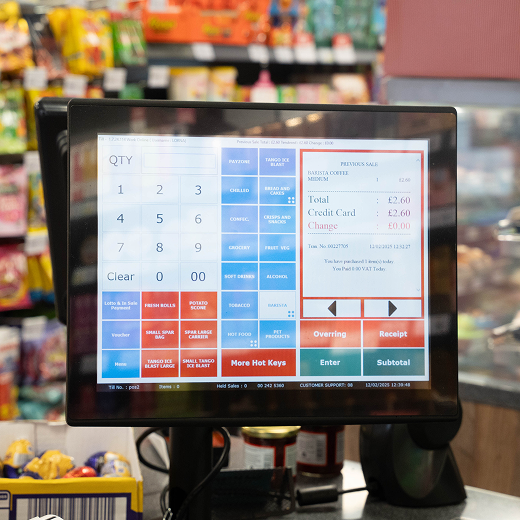
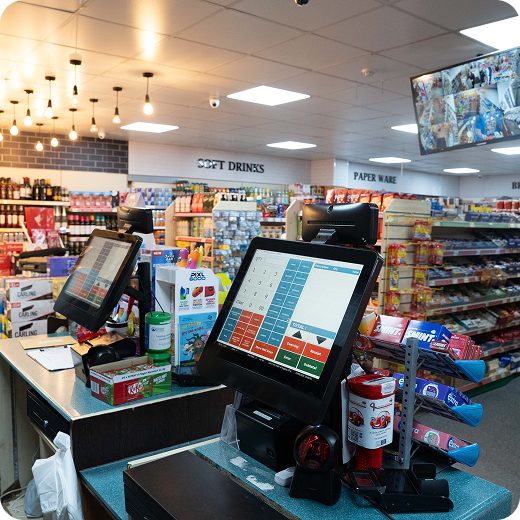
If you are trying to work out how much an EPOS system costs in the UK, you are probably finding the same problem most small retailers run into: the headline price rarely tells the full story.
One provider promotes a low monthly fee. Another bundles hardware. A third looks affordable until payment charges, setup, support, and add-ons start stacking up. For independent retailers, the real question is not simply “How much does EPOS cost?” but “What do I actually get for my money, and what will I still need to pay for?”
That is especially important now, because EPOS is no longer just a till. Modern retail systems are tied closely to payments, stock control, reporting, customer service, and day-to-day shop efficiency. UK payments are increasingly card-led and contactless, with UK Finance reporting that contactless payments rose to 17 billion and nearly a third of adults were registered for at least one mobile payment service.
MHouse’s own content already sits within that wider retail technology space, covering POS, handhelds, scanners, self-service and convenience-store operations, so this topic is a strong fit for your audience.
How Much Does an EPOS System Cost in the UK?
The honest answer is that there is no single fixed price.
For a small retailer, EPOS cost usually comes from several layers at once:
- software subscription
- hardware
- card payment processing
- setup and onboarding
- support and maintenance
- optional extras such as integrations, loyalty, advanced reporting, or extra terminals
That is why two systems can look similar on the surface but end up costing very different amounts over a year. One may appear cheaper because the monthly subscription is low, while another may cost more per month but include better reporting, stronger stock control, support, and fewer add-on charges.
In plain terms, the total cost of an EPOS system in the UK depends less on one advertised figure and more on how your business actually trades. A single-counter independent shop with simple needs will have a very different setup from a busy convenience store handling regular promotions, age-restricted sales, high stock turnover, and multiple staff accounts.
What Makes Up the Cost of an EPOS System?
To understand EPOS pricing properly, you need to break it into parts.
1. Software subscription
Most modern EPOS systems now use a subscription model rather than a one-off software purchase. This usually means you pay monthly or annually for access to the till software and back-office tools.
Depending on the provider, the fee may cover:
- the main till software
- cloud back-office access
- product management
- reporting
- user logins
- updates
- basic support
Some providers keep entry pricing low, then charge extra as soon as you need more locations, more staff accounts, deeper reports, or added functionality. Shopify, for example, uses subscription pricing and also states that third-party transaction fees can apply if a retailer uses an external payment provider rather than Shopify Payments.
That does not make the model bad. It simply means retailers need to check what is included before comparing “cheap” and “expensive” plans.
2. Hardware costs
Hardware can be one of the biggest differences in EPOS cost.
A basic setup might include:
- touchscreen till or tablet
- receipt printer
- barcode scanner
- cash drawer
- card terminal
A more advanced setup may also include:
- additional tills
- handheld stock devices
- kitchen printers for hospitality-style operations
- label printers
- customer displays
- self-service hardware
For small retailers, this is where the budget can shift quickly. One compact counter setup is manageable. But the moment you need multiple checkout points, handheld stock tools, or more advanced devices, the initial spend rises.
3. Payment processing fees
This is the part many retailers underestimate.
Even if your EPOS software looks affordable, the total cost can rise through card processing. In some systems, payments are fully integrated. In others, you may use a third-party provider. That can affect your overall costs, reporting flow, and operational simplicity.
Shopify’s pricing page states that third-party transaction fees apply when a merchant uses a third-party payment provider, and the rate varies by plan.
This is a useful reminder for retailers comparing EPOS offers: the software fee is not the full payment picture. You need to ask:
- Are card processing fees included?
- Is the provider tied to one payment route?
- Are there extra charges for using another terminal or gateway?
- Is the card terminal integrated with the till?
4. Setup, onboarding and training
Some retailers assume setup is included. Sometimes it is. Sometimes it is not.
Possible setup-related costs include:
- product import
- menu or inventory setup
- staff training
- configuration of promotions or VAT settings
- migration from an old till system
- on-site installation
- remote onboarding
A system that is simple to install yourself may look attractive. But if it takes too much time to configure, or your team struggles to use it on day one, the “saving” can disappear very quickly.
5. Support and maintenance
Support matters far more in retail than many buyers realise.
A till problem on a quiet Tuesday morning is annoying. A till problem on a Saturday rush is expensive.
Some EPOS packages include standard support but charge more for:
- out-of-hours help
- on-site visits
- replacement hardware
- premium account management
- faster service-level response
So when comparing EPOS prices, it is worth asking whether you are comparing software only or actual operational cover.
EPOS Monthly Fees Explained
One of the biggest search questions in this space is whether EPOS fees are mainly upfront or monthly.
In reality, many retailers now pay for EPOS in an ongoing monthly model. That monthly fee usually covers access to the software, ongoing updates, and some level of support. Cloud-led providers increasingly position their systems as broader retail platforms covering reporting, stock, payments and business management, not just checkout screens. Lightspeed’s UK messaging, for instance, places emphasis on integrated tools such as payments, reporting, inventory and retail operations rather than a simple till-only offer.
What is usually included in a monthly fee?
It may include:
- core POS software
- cloud access
- software updates
- basic reports
- some support
- limited users or terminals
What is often not included?
It may not include:
- hardware
- card machine charges
- payment processing fees
- extra users
- additional tills
- advanced features
- ecommerce integration
- accounting integrations
- premium support
- onboarding and training
Why monthly pricing can be misleading
A low monthly number can look brilliant in isolation. But if you then add hardware rental, higher card fees, extra user charges, and support costs, the system may turn out dearer than a package with a slightly higher monthly fee.
That is why independent retailers should always compare the total monthly and annual cost, not just the software subscription.
EPOS Hardware Costs for Small Retailers
Hardware needs vary a lot by shop type. Here is the practical way to think about it.
Basic single-till setup
This usually suits:
- a small independent shop
- a lower product count
- simple daily trade
- one main payment point
The focus here is usually reliability, ease of use, and a tidy checkout setup.
Growing retailer setup
This tends to suit:
- a busier shop floor
- more staff
- stronger stock management needs
- larger product range
- multiple users and permissions
At this level, the retailer may also need faster scanning, better reporting, and smoother payment integration.
Convenience store setup
This is often more complex than people expect.
Convenience stores usually need:
- fast barcode processing
- strong stock control
- promotion handling
- age-restriction prompts
- multiple staff permissions
- support for busy trading periods
- reliable reporting
- possibly handheld support for stock tasks
That means convenience-store EPOS cost is often higher than a very basic independent retail setup, but the operational value is usually much higher as well.
Hidden EPOS Costs in the UK That Retailers Often Miss
This is where many retailers get caught out.
The most common hidden EPOS costs include:
Installation and onboarding fees
A system may be advertised at an attractive monthly rate, but installation and setup can sit outside the package.
Staff training
If your team needs support to use the system properly, training may be an extra charge.
Payment processing add-ons
A low software fee can be offset by card fees or transaction charges.
Charges for extra tills or users
Adding another register or another member of staff may not be included in the base package.
Integration fees
If you want accounting software, ecommerce, loyalty tools, or specialist retail add-ons, there may be extra cost.
Support upgrades
Standard support may be included, but faster or broader cover may not be.
Data migration
Moving products, customers, or historic data from an old system can take time and may be charged separately.
Exit or contract costs
If the provider uses a minimum contract term, leaving early may carry a penalty.
This is why the cheapest EPOS quote can easily become the most expensive decision. It is not always the visible cost that causes problems. Often it is the list of extras that only appears once the shop is halfway through the buying process.
EPOS System Cost for Convenience Stores
If you are writing for MHouse’s ideal audience, this section matters.
Convenience stores often need more from EPOS than a standard small shop because the system is tied to speed, margins, stock control, and compliance. The till is not just a payment point. It is part of the store’s operational engine.
A convenience store may need EPOS support for:
- high stock movement
- regular promotional activity
- supplier ordering workflows
- age-restricted sales prompts
- multiple operators
- peak trading speed
- handheld stock checking
- margin visibility across many lines
That means the cheapest small-business POS setup is not always suitable for a convenience store. A system that looks more affordable on paper may create extra admin, slower transactions, or poor visibility in practice.
For this type of retailer, cost should always be weighed against:
- checkout speed
- stock accuracy
- staff accountability
- reporting quality
- theft and loss control
- ease of promotions
EPOS System Cost for Independent Retailers
Independent retailers are not all the same, but they often share similar concerns:
- keeping overheads under control
- avoiding long, rigid contracts
- not overpaying for features they do not need
- leaving room to grow
A gift shop, vape shop, off licence, pet shop, deli, or specialist store may not need the same level of complexity as a busy convenience store, but they still need a system that can handle daily retail demands without creating unnecessary manual work.
For independent retailers, the best-value EPOS system is usually one that balances:
- affordable entry cost
- easy setup
- solid support
- clean reporting
- stock control
- room to scale later
That balance is often more important than going for the absolute lowest price.
Is a Cheap EPOS System Actually Cheaper?
Not always.
When a cheap system can make sense
A lower-cost EPOS setup may suit:
- very small shops
- pop-ups
- seasonal traders
- simple product ranges
- single-user operations
In those cases, flexibility and low commitment can be attractive. Some card and POS providers market pay-as-you-go or low-commitment models specifically to appeal to smaller merchants who want to avoid heavy fixed costs.
When cheap becomes expensive
A cheap EPOS setup can become poor value when it leads to:
- slow transactions
- weak stock accuracy
- poor reporting
- limited support
- awkward payment workflows
- manual admin
- repeated workarounds
- expensive add-ons later
This is the point many small retailers miss. Price and value are not the same thing.
A system that saves you a bit each month but costs you hours in admin, missed stock issues, or slower service may be the dearer option in the long run.
What Should Small Retailers Look For Besides Price?
Retailers absolutely should care about price. But not price alone.
Before choosing an EPOS system, small retailers should also look at:
Ease of use
Can staff learn it quickly and use it confidently under pressure?
Stock control
Does it help you stay on top of products, movement and reordering?
Reporting
Can you quickly see what is selling, what is slowing down, and where margin is being lost?
Payment integration
Does the till connect smoothly with card payments and reduce manual errors?
Support quality
What happens if something goes wrong during trading hours?
Flexibility
Can the system adapt if your shop grows, adds terminals, or expands product range?
Reliability
Is it built for real-world retail conditions, not just a neat demo?
The right EPOS system should not just process sales. It should make the shop easier to run.
Questions to Ask Before You Compare EPOS Prices
Before committing to any provider, ask these questions plainly:
- What exactly is included in the monthly fee?
- Is hardware included, rented, or separate?
- Are payment processing fees included or extra?
- Do you charge for setup and training?
- How much do extra users or tills cost?
- Is support fully included?
- Are software updates part of the package?
- Do you charge for integrations?
- Is there a minimum contract term?
- What does migration from my current system involve?
- What happens if my internet connection drops?
- What support do I get during busy trading periods?
These questions can save a retailer from being drawn in by a price that looks good in an advert but does not match the reality of day-to-day use.
Sample EPOS Cost Scenarios
It helps to think in terms of business type rather than one national figure.
Small single-site independent shop
This retailer may need:
- one till
- one scanner
- one printer
- card acceptance
- basic stock management
- simple reporting
Their biggest concern is often keeping the upfront cost reasonable while still getting a reliable system.
Busy convenience store
This retailer may need:
- more robust stock control
- faster checkout speed
- multiple staff permissions
- promotional flexibility
- supplier-facing practicality
- support during busy trade
- handheld or additional devices
Here, the “true cost” of EPOS should be judged against how much time, stock loss, and till friction it removes.
Growing retailer with multiple terminals
This retailer may need:
- more than one checkout point
- stronger reporting
- more user accounts
- better management controls
- room for future expansion
In this scenario, choosing a system that scales well is often more cost-effective than repeatedly switching to a new setup later.
How to Keep EPOS Costs Under Control
There are sensible ways to reduce EPOS cost without choosing the wrong system.
Focus on total cost, not the headline fee
Always compare software, hardware, payments, setup and support together.
Do not pay for features you genuinely will not use
Some shops need advanced tools. Others do not. Buy with purpose.
Be clear on payment charges
Processing fees can change the economics of a system more than retailers expect.
Ask for the full breakdown in writing
This is one of the easiest ways to avoid hidden costs.
Think one year ahead, not just one month ahead
A system that feels cheap today may become limiting very quickly.
Choose scalability carefully
Switching EPOS too soon can cost more than buying properly the first time.
Is an EPOS System Worth the Cost for a Small Retailer?
For most serious retailers, yes, provided the system fits the business properly.
The value of EPOS is not only in taking payment. It is also in:
- saving staff time
- improving stock control
- reducing till mistakes
- making reporting clearer
- supporting faster service
- helping the owner manage the business more confidently
That matters even more in a UK market where card and mobile-led payment behaviour continues to shape customer expectations. UK Finance’s figures on debit, contactless and mobile payment adoption show clearly that retailers are operating in a payments environment where speed and convenience matter.
So the right question is not whether EPOS costs money. Of course it does. The better question is whether the system helps your shop run better, trade faster, and make stronger decisions.
For a well-matched retailer, that answer is usually yes.
Final Thoughts
The cost of an EPOS system in the UK is not one simple number.
For small retailers, the full cost usually includes software, hardware, payment processing, onboarding, support, and the extra tools needed to keep the business running smoothly. That is why comparing EPOS systems on monthly fee alone is a mistake.
The smartest buyers look past the sales headline and ask what the system actually includes, how it fits their shop, and whether it will save time, reduce errors, and support growth.
For independent retailers and convenience stores alike, the best-value EPOS system is rarely the one that merely looks cheapest. It is the one that gives you the right mix of reliability, visibility, payment flow, and operational control for the way your business trades.
FAQs
How much does an EPOS system cost per month in the UK?
It varies by provider and by business need. Monthly cost often covers software access, updates and some support, but hardware, payment fees, onboarding and add-ons may be extra.
What is included in an EPOS monthly fee?
Usually the software licence, updates, and access to core tools such as reporting or back-office access. Some packages include more than others, so retailers should always ask for a full breakdown.
Are card machine fees separate from EPOS fees?
They often are. Some providers bundle payments more tightly, while others charge separately or apply fees if you use a third-party processor. Shopify, for example, states that third-party transaction fees can apply when using an external provider.
What hidden EPOS costs should I watch out for?
Look out for setup fees, training charges, hardware costs, extra till or user fees, integration charges, premium support, data migration, and contract exit costs.
Is cloud EPOS cheaper than traditional EPOS?
Not always in a straight line, but cloud EPOS often gives more flexibility, ongoing updates and easier remote access. The better comparison is total value, not just software format.
Is a cheaper EPOS system better for small shops?
Sometimes, but not automatically. A cheaper system may suit a simple setup, but if it creates more admin, weaker reporting or higher add-on costs, it can work out worse overall.
What should convenience stores look for in EPOS pricing?
They should look beyond entry-level till cost and focus on speed, stock control, promotions, staff permissions, payment flow and long-term reliability.
Does an EPOS system help justify its own cost?
In many cases, yes. Better stock control, faster checkout, fewer mistakes and clearer reporting can easily make the investment worthwhile over time.